OOP Concepts in Java
Master the four pillars of Object Oriented Programming with real world analogies, Java code examples, comparison tables, and 30+ classic interview questions. From encapsulation to SOLID principles, everything you need to crack your next interview.
Object Oriented Programming
What is Object Oriented Programming?
Object Oriented Programming (OOP) is a programming paradigm based on the concept of "objects" which contain data (attributes) and code (methods).
Key Concepts:
- Objects: Instances of classes that represent real-world entities
- Classes: Blueprints or templates for creating objects
- Data (Attributes): Variables that hold the state of an object
- Methods (Behavior): Functions that define what an object can do
Why OOP?
- Modularity: Code is organized into independent, reusable pieces
- Maintainability: Easier to update and modify code
- Reusability: Classes can be reused across different programs
- Scalability: Easy to extend functionality without breaking existing code
What are the Four Pillars of OOP?
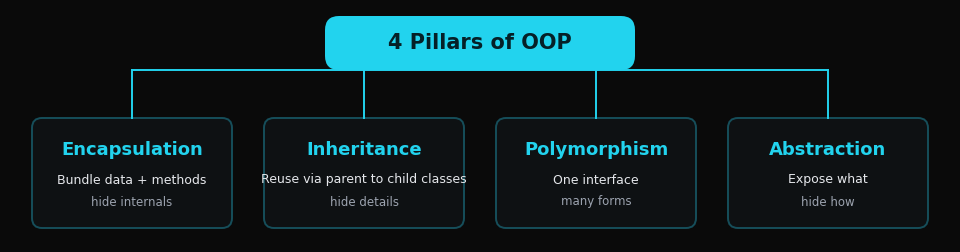
The four fundamental principles of OOP are:
1. Encapsulation
Bundling data and methods together and hiding internal implementation details.
2. Inheritance
Creating new classes from existing ones, inheriting attributes and methods.
3. Polymorphism
Objects of different types responding to the same method call in different ways.
4. Abstraction
Hiding complex implementation and showing only essential features.
Each of these pillars will be explored in detail in the following sections.
Difference between Class and Object?
| Class | Object |
|---|---|
| Blueprint or template | Instance of a class |
| Logical entity | Physical entity |
| Declared once | Created many times |
| No memory allocation | Memory allocated when created |
| Example: Car (template) | Example: myCar, yourCar (instances) |
What is a Constructor?
A constructor is a special method that is automatically called when an object is created. It initializes the object's state.
Key Features:
- Same name as the class
- No return type (not even void)
- Called automatically when object is created
- Can be overloaded (multiple constructors)
Types of Constructors:
1. Default Constructor
No parameters, provides default values
2. Parameterized Constructor
Takes parameters to initialize object with specific values
3. Copy Constructor
Creates a new object as a copy of an existing object
What are Access Modifiers?
Access modifiers control the visibility and accessibility of classes, methods, and variables.
| Modifier | Class | Package | Subclass | World |
|---|---|---|---|---|
| public | ✓ | ✓ | ✓ | ✓ |
| protected | ✓ | ✓ | ✓ | ✗ |
| default | ✓ | ✓ | ✗ | ✗ |
| private | ✓ | ✗ | ✗ | ✗ |
Inheritance
What is Inheritance?
Inheritance is a mechanism where a new class (child/subclass) derives properties and behavior from an existing class (parent/superclass).
Benefits:
- Code Reusability: Avoid code duplication
- Method Overriding: Child can modify parent's behavior
- Hierarchical Classification: Represents real-world relationships
Types of Inheritance
1. Single Inheritance
One child class inherits from one parent class.
2. Multilevel Inheritance
Chain of inheritance (A → B → C).
3. Hierarchical Inheritance
Multiple child classes inherit from one parent.
4. Multiple Inheritance (Not in Java)
One child inherits from multiple parents. Not supported in Java to avoid ambiguity (Diamond Problem).
Java Alternative: Use interfaces
5. Hybrid Inheritance
Combination of two or more types of inheritance.
What is 'super' keyword?
The super keyword refers to the immediate parent class object.
Uses:
1. Access Parent's Variables
2. Call Parent's Methods
3. Call Parent's Constructor
What is Method Overriding?
Method Overriding occurs when a child class provides a specific implementation for a method already defined in its parent class.
Rules:
- Method signature must be the same
- Return type must be same or covariant
- Access modifier cannot be more restrictive
- Cannot override final or static methods
Polymorphism
What is Polymorphism?
Polymorphism means "many forms". It allows objects of different types to be accessed through the same interface.
The word comes from Greek: poly (many) + morph (form)
Types:
- Compile-time (Static): Method Overloading, Operator Overloading
- Runtime (Dynamic): Method Overriding
Compile-time Polymorphism (Method Overloading)
Method Overloading allows multiple methods with the same name but different parameters in the same class.
Rules:
- Same method name
- Different number of parameters, OR
- Different type of parameters, OR
- Different order of parameters
Cannot overload by:
- Return type alone
- Access modifiers
Runtime Polymorphism (Method Overriding)
Method Overriding occurs when a subclass provides a specific implementation of a method already defined in its parent class.
Key Concepts:
- Decided at runtime (dynamic binding)
- Requires inheritance
- Method signature must be identical
Method Overloading vs Method Overriding
| Aspect | Overloading | Overriding |
|---|---|---|
| When | Compile-time | Runtime |
| Where | Same class | Inheritance required |
| Parameters | Must be different | Must be same |
| Return type | Can be different | Must be same (or covariant) |
| Binding | Static binding | Dynamic binding |
| Purpose | Increase readability | Provide specific implementation |
What is Covariant Return Type?
Covariant return type allows an overriding method to return a subtype of the return type declared in the parent class.
Benefits:
- More specific return types
- Avoids type casting
- More flexible code
Abstraction
What is Abstraction?
Abstraction is hiding the implementation details and showing only the essential features to the user.
Real-world Example:
When you drive a car, you only use steering wheel, pedals, and gears. You don't need to know how the engine works internally.
In Java, abstraction is achieved through:
- Abstract Classes (0-100% abstraction)
- Interfaces (100% abstraction)
Benefits:
- Reduces complexity
- Hides implementation details
- Enhances security
- Supports code maintenance
What is an Abstract Class?
An abstract class is a class that cannot be instantiated and may contain abstract methods (methods without implementation).
Key Features:
- Declared with
abstractkeyword - Cannot create objects directly
- Can have abstract and non-abstract methods
- Can have constructors
- Can have instance variables
What is an Interface?
An interface is a completely abstract class that contains only abstract methods (until Java 8).
Key Features:
- 100% abstraction (by default)
- All methods are public and abstract (before Java 8)
- All fields are public, static, and final
- Cannot be instantiated
- A class can implement multiple interfaces
Java 8+ Interface Features:
- Default methods: Methods with implementation
- Static methods: Utility methods
Abstract Class vs Interface
| Feature | Abstract Class | Interface |
|---|---|---|
| Methods | Abstract + Concrete | All abstract (before Java 8) |
| Variables | Can have any type | Only public static final |
| Constructor | Can have | Cannot have |
| Multiple | Can extend one class | Can implement multiple |
| Access Modifiers | Any modifier | Public only (default) |
| When to use | Common base with shared code | Contract/behavior definition |
When to use Abstract Class:
- Share code among closely related classes
- Need non-static, non-final fields
- Need access modifiers other than public
When to use Interface:
- Unrelated classes need to implement same methods
- Specify behavior without implementation
- Take advantage of multiple inheritance
Multiple Inheritance using Interfaces
Java doesn't support multiple inheritance with classes to avoid the Diamond Problem. However, a class can implement multiple interfaces.
Diamond Problem:
When a class inherits from two classes that have the same method, which method should it inherit?
Encapsulation
What is Encapsulation?
Encapsulation is the bundling of data (variables) and methods that operate on that data into a single unit (class), and restricting direct access to some components.
Key Concepts:
- Data Hiding: Make variables private
- Access Control: Provide public getter/setter methods
- Controlled Access: Validate data before setting
Benefits:
- Data protection and security
- Flexibility to change implementation
- Control over data (validation)
- Read-only or write-only properties
Getters and Setters
Getters and Setters are methods that provide controlled access to private variables.
Naming Convention:
- Getter: getVariableName()
- Setter: setVariableName()
- Boolean: isVariableName()
Benefits:
- Data validation before setting
- Read-only properties (only getter)
- Write-only properties (only setter)
- Computed properties
Encapsulation vs Abstraction
| Aspect | Encapsulation | Abstraction |
|---|---|---|
| Purpose | Data hiding and protection | Hide implementation details |
| Focus | HOW to achieve | WHAT to achieve |
| Level | Data level | Design level |
| Implementation | Private variables + public methods | Abstract classes + Interfaces |
| Example | Private balance in BankAccount | Animal interface with makeSound() |
Simple Analogy:
- Encapsulation: A capsule hides medicine inside
- Abstraction: You know the capsule cures headache, but don't know how
What is 'this' keyword?
The this keyword refers to the current object instance.
Uses:
1. Distinguish between instance variables and parameters
2. Call another constructor
3. Pass current object as parameter
4. Return current object
Real World Analogy
Car Manufacturing System - Complete OOP Example
Let's understand all OOP concepts using a Car Manufacturing System.
1. Class and Object
- Class: Car blueprint/design created by engineers
- Object: Actual cars manufactured from that blueprint
Think of it like a cookie cutter (class) and cookies (objects).
2. Encapsulation
A car's engine is enclosed in a hood. You can't directly access internal parts.
- You use the accelerator pedal (public method) to increase speed
- The engine internals are hidden (private variables)
- The pedal provides controlled access to the engine
3. Inheritance
Different car types inherit from a base Vehicle design:
- Vehicle (Parent): Common features - engine, wheels, steering
- Car (Child): Inherits all + adds trunk, 4 doors
- Truck (Child): Inherits all + adds cargo bed, towing capacity
4. Polymorphism
All vehicles have a start() method, but each starts differently:
- Electric Car: Silent start, no ignition sound
- Diesel Truck: Loud rumbling start
- Sports Car: Roaring engine start
Same method name, different behaviors!
5. Abstraction
When you drive a car:
- You use steering wheel, pedals, gear (interface)
- You don't need to know how fuel injection, combustion, transmission work (hidden implementation)
Abstraction shows "WHAT" a car can do, not "HOW" it does it.
Banking System - OOP Example
Encapsulation in Banking
Your bank account balance is private. You can't directly change it.
- Private: Account balance
- Public methods: deposit(), withdraw(), getBalance()
- Bank validates every transaction
Inheritance in Banking
- Account (Parent): accountNumber, balance, deposit(), withdraw()
- SavingsAccount (Child): + interestRate, calculateInterest()
- CurrentAccount (Child): + overdraftLimit, allowOverdraft()
Polymorphism in Banking
All accounts have calculateInterest(), but:
- Savings: 4% interest
- Fixed Deposit: 7% interest
- Current: 0% interest
Abstraction in Banking
ATM interface shows:
- Withdraw, Deposit, Check Balance (visible)
- Complex backend processing hidden
Restaurant Ordering System
Classes and Objects
- Class: Menu (template for dishes)
- Objects: Pizza, Burger, Pasta (specific dishes)
Encapsulation
- Kitchen recipe is secret (private)
- Customer orders through waiter (public interface)
- No direct access to kitchen
Inheritance
- MenuItem (Parent): name, price, description
- Pizza (Child): + size, toppings
- Beverage (Child): + volume, temperature
Polymorphism
All items have prepare() method:
- Pizza: Bake in oven for 15 minutes
- Salad: Mix ingredients, serve cold
- Coffee: Brew and serve hot
Abstraction
- Customer sees menu and prices
- Cooking process is hidden
- Just order and receive food!
Coding World In-depth
E-commerce System - Complete Implementation
A comprehensive example demonstrating all OOP concepts in an e-commerce system.
System Overview:
- Encapsulation: User class protects password with validation
- Abstraction: Product is abstract - defines contract for all products
- Inheritance: Electronics and Clothing extend Product
- Polymorphism: Each product calculates shipping differently
Real-world mapping: This mimics how Amazon/Flipkart categorize products and calculate shipping costs based on product type.
Library Management System
Library system demonstrating interface implementation and abstract classes.
Design Patterns Used:
- Interface: Borrowable defines common behavior for all library items
- Abstract Class: LibraryItem implements common logic, leaves fees to subclasses
- Template Method: checkout/return logic is same, late fees vary by item type
Why this design? Different items (books, DVDs, magazines) share borrowing behavior but have different late fee policies. Abstract class provides shared implementation while allowing customization.
Payment Processing System
Payment processing system using the Strategy Pattern - a behavioral design pattern.
Why Use Interfaces Here?
- Flexibility: Easy to add new payment methods (Bitcoin, UPI, etc.)
- Loose Coupling: PaymentProcessor doesn't need to know payment details
- Open/Closed Principle: Open for extension, closed for modification
Real-world usage: E-commerce platforms like Stripe, PayPal APIs use similar patterns to support multiple payment gateways without changing core business logic.
Notification System with Strategy Pattern
Notification system using the Strategy Pattern - allows runtime selection of notification method.
Design Benefits:
- Runtime Flexibility: Change notification method on-the-fly
- Single Responsibility: Each strategy handles one notification type
- Easy Testing: Can mock strategies for unit tests
- User Preferences: Users can choose preferred notification method
Real-world example: Apps like WhatsApp, Slack allow users to choose notification preferences (push, email, SMS) - implemented using strategy pattern.
Classic Interview Questions
Why is Java not 100% Object Oriented?
Java is not considered 100% object oriented because of primitive data types.
Reasons:
- Primitive types exist: int, char, boolean, double, etc. are not objects
- Not everything is an object: Primitives don't inherit from Object class
- Static methods: Can be called without creating objects
Languages that are 100% OO:
Smalltalk, Ruby - everything is an object, even primitives
Can we override static methods?
No, we cannot override static methods. This is called method hiding, not overriding.
Why?
- Static methods belong to the class, not objects
- Resolved at compile-time (static binding)
- Overriding requires runtime polymorphism
Can we override private methods?
No, private methods cannot be overridden.
Reason:
- Private methods are not visible to subclasses
- Overriding requires method to be accessible
- You can have a method with the same name in child, but it's a new method
Can constructor be overridden?
No, constructors cannot be overridden.
Reasons:
- Constructors are not inherited
- Each class must have its own constructor
- Constructor name must match class name
However, constructors can be overloaded.
What is the diamond problem?
The diamond problem occurs in multiple inheritance when a class inherits from two classes that have a common parent.
Java's Solution:
- Java doesn't support multiple inheritance with classes
- Use interfaces instead
- Java 8+ allows default methods in interfaces, bringing back the problem
- Solution: Class must explicitly override the method
Difference between Composition and Inheritance?
Inheritance: "IS-A" relationship
Dog IS-A Animal
Composition: "HAS-A" relationship
Car HAS-A Engine
| Aspect | Inheritance | Composition |
|---|---|---|
| Relationship | IS-A | HAS-A |
| Coupling | Tight coupling | Loose coupling |
| Flexibility | Less flexible | More flexible |
| When to use | When subclass truly is a type of parent | When you need functionality without IS-A |
Best Practice: "Favor composition over inheritance" - Design Patterns book
What are SOLID principles?
SOLID principles are five design principles for writing maintainable and scalable OOP code.
S - Single Responsibility Principle
A class should have only one reason to change.
O - Open/Closed Principle
Open for extension, closed for modification.
L - Liskov Substitution Principle
Subclasses should be substitutable for their base classes.
I - Interface Segregation Principle
Clients should not be forced to depend on interfaces they don't use.
D - Dependency Inversion Principle
Depend on abstractions, not concretions.
Explain Association, Aggregation, and Composition
1. Association
A general relationship between two classes. Objects can exist independently.
2. Aggregation (Weak "HAS-A")
Special form of association. Child can exist independently of parent.
3. Composition (Strong "HAS-A")
Strong ownership. Child cannot exist without parent.
| Type | Relationship | Lifetime | Example |
|---|---|---|---|
| Association | Uses | Independent | Teacher-Student |
| Aggregation | Has-A (weak) | Independent | Department-Teacher |
| Composition | Part-Of (strong) | Dependent | House-Room |
What is tight coupling vs loose coupling?
Tight Coupling
Classes are highly dependent on each other. Changes in one affect the other.
Loose Coupling
Classes are independent. Changes in one don't affect the other.
Benefits of Loose Coupling:
- Easier to maintain
- Easier to test (can use mocks)
- More flexible
- Supports dependency injection
What is the difference between final, finally, and finalize?
1. final (keyword)
Used to declare constants, prevent inheritance, and prevent method overriding.
2. finally (block)
Used in exception handling. Always executes after try-catch.
3. finalize() (method)
Called by garbage collector before object is destroyed. Deprecated in Java 9+
| Term | Type | Purpose |
|---|---|---|
| final | Keyword | Make constants, prevent inheritance/overriding |
| finally | Block | Execute code after try-catch |
| finalize | Method | Cleanup before garbage collection (deprecated) |