API Design Interview Questions & Answers (2026)
50+ API design interview questions with detailed answers, comparison tables, and real world code examples. Covers REST principles, HTTP methods and status codes, authentication strategies (OAuth, JWT, API Keys), pagination, rate limiting, versioning, caching, webhooks, and scenario based system design questions.
Core API Design
What is an API? REST vs SOAP?
An API (Application Programming Interface) is a contract that allows two software systems to communicate with each other. It defines:
- How requests should be made
- What data is expected
- What responses will be returned
APIs abstract internal implementation and expose only what is necessary, enabling loose coupling between systems.
REST vs SOAP
| Feature | REST | SOAP |
|---|---|---|
| Style | Architectural style | Strict protocol |
| Data format | JSON (mostly) | XML only |
| Transport | HTTP mainly | HTTP, SMTP, TCP |
| State | Stateless | Can be stateful |
| Performance | Lightweight, fast | Heavy, slow |
| Usage today | Everywhere | Mostly legacy systems |
REST is preferred for modern applications due to simplicity and performance. SOAP is used in enterprise legacy systems.
What makes an API RESTful?
An API is RESTful only if it adheres to REST constraints.
REST Architectural Constraints
1. Client Server Architecture
- Client handles UI and user experience
- Server handles data and business logic
- Both evolve independently
2. Statelessness
- Server does not store client session state
- Each request is self contained
3. Cacheability
- Responses specify cache rules
- Improves performance and scalability
4. Uniform Interface
This is the most critical constraint.
Explain statelessness in REST.
Statelessness means that the server does not retain any information about the client's previous requests.
Each request must contain:
- Authentication details
- Required parameters
- Contextual data
Benefits:
- Easy horizontal scaling
- Fault tolerance
- Reduced server memory usage
Difference between REST and RPC.
REST
- Resource-oriented
- URLs represent entities
- HTTP semantics are meaningful
Example:
RPC (Remote Procedure Call)
- Action-oriented
- URLs represent operations
- HTTP is used as a transport mechanism
Example:
REST vs GraphQL. When would you use each?
REST
- Multiple endpoints (one per resource)
- Fixed response structure
- Can lead to over fetching or under fetching
GraphQL
- Single endpoint
- Client specifies exactly what data it needs
- Reduces over fetching
When to use REST:
- Simple CRUD operations
- Well-defined resources
- Easier caching
When to use GraphQL:
- Complex data requirements
- Multiple related entities
- Mobile apps (reduce bandwidth)
HTTP Methods
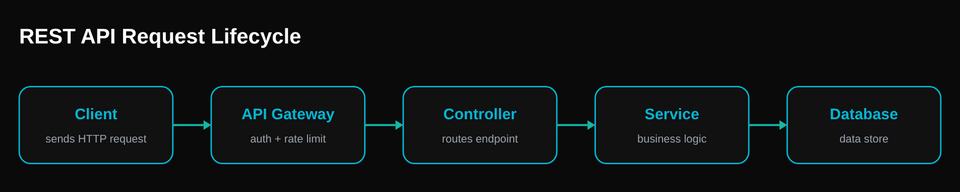
HTTP Methods & Semantics
HTTP methods define what action the client wants to perform on a resource. Correct usage is critical for clarity, scalability, caching, security, and correctness.
Difference Between GET, POST, PUT, PATCH, DELETE
Each HTTP method has a clear semantic meaning. Misusing them is a design flaw, not a style choice.
| Method | Purpose | Creates Resource | Modifies Resource | Idempotent | Safe |
|---|---|---|---|---|---|
| GET | Retrieve data | No | No | Yes | Yes |
| POST | Create / Trigger | Yes | Yes | No | No |
| PUT | Replace resource | Yes (if absent) | Yes (full) | Yes | No |
| PATCH | Partial update | No | Yes (partial) | Not guaranteed | No |
| DELETE | Remove resource | No | Yes | Yes | No |
What is idempotency? Which HTTP methods are idempotent?
Idempotency
An operation is idempotent if performing it multiple times results in the same system state.
HTTP Methods and Idempotency
| Method | Idempotent | Explanation |
|---|---|---|
| GET | Yes | Read-only |
| PUT | Yes | Full replacement |
| DELETE | Yes | Deletes once |
| HEAD | Yes | Metadata only |
| POST | No | Creates new resource |
PUT vs PATCH. Why both exist?
PUT (Full Replacement)
- Replaces the entire resource
- Missing fields are removed
- Idempotent by definition
PATCH (Partial Update)
- Updates only specified fields
- Does not affect other fields
- Not strictly idempotent
Why Both Exist?
| Reason | Explanation |
|---|---|
| Clarity | PUT means replace, PATCH means modify |
| Safety | PATCH avoids accidental data loss |
| Efficiency | PATCH sends less data |
| Semantics | Different intentions, different guarantees |
Can GET have a request body?
Technically yes. Practically no.
Explanation
- HTTP specification does not forbid GET request bodies
- However:
- Servers often ignore them
- Proxies may drop them
- Caching systems do not consider them
Best Practice
- Use query parameters for GET
- Use POST if request data is complex
When should POST be used instead of PUT?
Use POST When:
- Server generates the resource ID
- Operation is non-idempotent
- Action is not a full replacement
- Triggering processing (emails, payments)
PUT is Used When:
- Client knows the resource URI
- Entire resource state is provided
- Idempotency is required
Safe vs idempotent methods.
Safe Methods
A method is safe if it does not modify server state.
Safe methods:
- GET
- HEAD
- OPTIONS
Even if called repeatedly, they only read data.
Idempotent Methods
A method is idempotent if performing it multiple times results in the same system state.
Idempotent methods:
- GET
- PUT
- DELETE
- HEAD
Key Difference
| Concept | Meaning |
|---|---|
| Safe | No side effects |
| Idempotent | Same result on repetition |
A method can be:
- Idempotent but not safe (DELETE)
- Safe and idempotent (GET)
HTTP Status Codes
What are HTTP status codes and why do they matter?
HTTP status codes are three digit numbers returned by the server to indicate the result of a client's request. They are essential for API design because they communicate success, failure, and error context without requiring the client to parse the response body.
Status Code Categories
| Range | Category | Meaning |
|---|---|---|
| 1xx | Informational | Request received, processing continues |
| 2xx | Success | Request was successfully processed |
| 3xx | Redirection | Further action needed from client |
| 4xx | Client Error | Problem with the request itself |
| 5xx | Server Error | Server failed to process a valid request |
Most important status codes every API developer must know
Success Codes (2xx)
| Code | Name | When to Use |
|---|---|---|
| 200 | OK | GET request succeeded, data returned |
| 201 | Created | POST request succeeded, new resource created |
| 202 | Accepted | Request accepted for async processing (not yet completed) |
| 204 | No Content | DELETE or PUT succeeded, nothing to return |
Client Error Codes (4xx)
| Code | Name | When to Use |
|---|---|---|
| 400 | Bad Request | Invalid syntax, missing required fields, validation failure |
| 401 | Unauthorized | Missing or invalid authentication credentials |
| 403 | Forbidden | Authenticated but lacks permission for this resource |
| 404 | Not Found | Resource does not exist at the given URI |
| 405 | Method Not Allowed | HTTP method not supported for this endpoint |
| 409 | Conflict | Duplicate resource, version conflict, or state conflict |
| 422 | Unprocessable Entity | Request is well formed but semantically invalid |
| 429 | Too Many Requests | Rate limit exceeded, client must slow down |
Server Error Codes (5xx)
| Code | Name | When to Use |
|---|---|---|
| 500 | Internal Server Error | Unexpected server side failure |
| 502 | Bad Gateway | Upstream service returned an invalid response |
| 503 | Service Unavailable | Server is temporarily down (maintenance, overload) |
| 504 | Gateway Timeout | Upstream service did not respond in time |
What is the difference between 401 Unauthorized and 403 Forbidden?
This is one of the most commonly confused pairs in API design interviews.
401 Unauthorized
- The client has not provided credentials or the credentials are invalid
- The client should authenticate and retry
- Think of it as: "Who are you? I don't know you."
403 Forbidden
- The client is authenticated but does not have permission
- Re-authenticating will not help
- Think of it as: "I know who you are, but you can't do this."
When should you use 400 vs 422 for validation errors?
400 Bad Request
- The request is malformed at a syntactic level
- Invalid JSON, missing Content-Type, bad query parameters
- The server cannot even parse the request
422 Unprocessable Entity
- The request is well formed but semantically invalid
- Server understood the structure but the values are wrong
- Example: email field present but value is not a valid email
Practical advice: Many APIs use 400 for both cases. If you want precision, use 422 for business logic validation. Either approach is acceptable as long as you are consistent.
URL Design & Resource Naming
What are the best practices for REST API URL design?
Good URL design makes an API intuitive, predictable, and self documenting. Follow these rules consistently.
1. Use Nouns, Not Verbs
2. Use Plural Nouns for Collections
3. Use Hierarchical Nesting for Relationships
4. Use Lowercase and Hyphens
5. Use Query Parameters for Filtering
How do you handle actions that are not CRUD operations?
Not every action maps cleanly to a CRUD resource. Here are common patterns for non standard actions.
Option 1: Sub Resource
Option 2: State as a Resource
Option 3: Controller Resource
For complex processes that don't map to a single resource.
Rule of thumb: Try sub resources first. If the action changes a state, use PATCH. Use controller resources only as a last resort.
What is HATEOAS and is it used in practice?
HATEOAS (Hypermedia as the Engine of Application State) is a REST constraint where the API response includes links to related actions and resources. The client discovers available operations through these links rather than hardcoding URLs.
Benefits
- API is self documenting and discoverable
- Client does not need to hardcode URLs
- Server can change URL structure without breaking clients
Reality
Most APIs do not implement HATEOAS in practice. It adds complexity and most teams prefer clear documentation over hypermedia links. However, it is frequently asked in interviews as a theoretical concept. Know what it is and when it could be useful, but be honest that most production APIs skip it.
Authentication & Authorization
API Key vs OAuth vs JWT
1. API Key
A simple secret string passed in requests to identify the caller.
How it works:
- Server generates a unique key for each client
- Client includes key in every request (header or query param)
- Server validates the key
Pros:
- Simple to implement
- Good for server-to-server communication
- Easy to revoke
Cons:
- No user identity (only identifies the app)
- Hard to implement fine-grained permissions
- Risk if leaked
Use Case:
Machine-to-machine communication, backend services, third party API integrations.
2. OAuth 2.0
An authorization framework that allows third party apps to access user resources without exposing credentials.
How it works:
- User authorizes app to access their data
- Authorization server issues an access token
- App uses token to make API requests
- Token has limited scope and expiration
Flow Example (Authorization Code):
- App redirects user to authorization server
- User logs in and grants permission
- Server redirects back with authorization code
- App exchanges code for access token
- App uses token to access protected resources
Pros:
- User doesn't share password with third party apps
- Fine-grained permissions (scopes)
- Tokens can be revoked without changing password
- Supports refresh tokens for long-lived access
Cons:
- Complex to implement
- Requires multiple round trips
- Token storage and management overhead
Use Case:
Third-party integrations (e.g., "Sign in with Google"), delegated access, social logins.
3. JWT (JSON Web Token)
A compact, self contained token format for securely transmitting information between parties.
Structure:
How it works:
- Server creates JWT with user info and signs it
- Client stores JWT (localStorage, cookie)
- Client sends JWT with each request
- Server verifies signature and extracts data
Pros:
- Stateless (no server-side storage needed)
- Self-contained (includes user info)
- Works across multiple servers
- Easy to scale
Cons:
- Cannot be revoked before expiration
- Larger than session IDs
- Sensitive data in payload is visible (base64 encoded, not encrypted)
Use Case:
Single Sign-On (SSO), microservices authentication, mobile apps, stateless APIs.
Comparison Table
| Feature | API Key | OAuth | JWT |
|---|---|---|---|
| Complexity | Simple | Complex | Moderate |
| User Identity | No | Yes | Yes |
| Stateless | No | No | Yes |
| Revocation | Easy | Easy | Hard |
| Best For | Server-to-server | Third-party access | Stateless APIs |
Where should tokens be sent?
Tokens should be sent in the Authorization header using the Bearer scheme.
✅ Recommended:
Why Authorization Header?
- Secure: Not logged in URLs or browser history
- Standard: Industry convention (RFC 6750)
- Clean: Separates auth from business logic
- CORS-friendly: Works with cross origin requests
❌ Avoid:
1. Query Parameters
Problems:
- Logged in server logs
- Visible in browser history
- Can be leaked via Referer header
2. Request Body (for GET requests)
Problems:
- GET requests shouldn't have a body
- Breaks HTTP semantics
- Caching issues
3. Cookies (for APIs)
Cookies work for browser based sessions but are problematic for APIs:
- CSRF vulnerability
- Not ideal for mobile/desktop apps
- Same-origin limitations
Exception: Web Applications
For traditional web apps, HttpOnly cookies are acceptable and can be more secure:
- Protected from XSS attacks
- Automatically sent by browser
- Require CSRF protection
Access token vs Refresh token
Access Token
A short-lived token used to access protected resources.
Characteristics:
- Short lifespan: 15 minutes to 1 hour
- Sent with every request
- Contains user permissions/claims
- Cannot be easily revoked (before expiry)
Refresh Token
A long-lived token used to obtain new access tokens without re authentication.
Characteristics:
- Long lifespan: Days to months
- Used only to get new access tokens
- Stored securely (database)
- Can be revoked
Flow:
- User logs in → Server returns access token + refresh token
- Client uses access token for API requests
- Access token expires
- Client sends refresh token to get new access token
- Server validates refresh token and issues new access token
Why Use Both?
| Benefit | Explanation |
|---|---|
| Security | Short-lived access tokens limit damage if leaked |
| User Experience | Users don't need to re login frequently |
| Revocation | Refresh tokens can be revoked from database |
| Rotation | Can implement refresh token rotation for added security |
Best Practices:
- Store refresh tokens securely (encrypted in DB)
- Implement refresh token rotation
- Set appropriate expiration times
- Revoke refresh tokens on logout
- Detect and handle refresh token reuse (security breach)
How do you secure APIs?
1. Authentication & Authorization
- Use OAuth 2.0 or JWT for authentication
- Implement role-based access control (RBAC)
- Validate permissions on every request
2. HTTPS Only
- Always use TLS/SSL encryption
- Reject HTTP requests
- Use HSTS headers
3. Input Validation
- Validate all input data
- Sanitize user inputs
- Use parameterized queries (prevent SQL injection)
- Limit request size
4. Rate Limiting
- Prevent brute force attacks
- Protect against DDoS
- Use token bucket or sliding window algorithms
5. API Keys & Secrets
- Never hardcode secrets in code
- Use environment variables
- Rotate keys regularly
- Store in secure vaults (AWS Secrets Manager, HashiCorp Vault)
6. CORS Configuration
- Whitelist specific origins
- Don't use wildcard (*) in production
- Validate Origin header
7. Security Headers
- Content-Security-Policy
- X-Content-Type-Options: nosniff
- X-Frame-Options: DENY
- Strict-Transport-Security
8. Logging & Monitoring
- Log all authentication attempts
- Monitor for suspicious patterns
- Set up alerts for anomalies
- Never log sensitive data (passwords, tokens)
9. API Versioning
- Version your APIs
- Maintain backward compatibility
- Deprecate old versions gracefully
10. Error Handling
- Don't expose sensitive info in errors
- Use generic error messages
- Log detailed errors server-side
How to prevent replay attacks?
A replay attack occurs when an attacker intercepts a valid request and resends it to gain unauthorized access or repeat an action.
Prevention Strategies:
1. Timestamps
Include a timestamp in each request and reject requests older than a threshold (e.g., 5 minutes).
2. Nonce (Number Used Once)
A unique value for each request. Server tracks used nonces and rejects duplicates.
3. Request Signing
Create a signature using request data + timestamp + secret key. Server verifies signature.
4. Token Expiration
- Use short-lived tokens (15-60 minutes)
- Implement refresh token mechanism
- Expired tokens cannot be replayed
5. HTTPS Only
- Prevents interception of requests
- TLS encryption protects data in transit
- Essential for all other strategies to work
6. Idempotency Keys
For critical operations (payments, orders), use idempotency keys to ensure operations execute only once.
Best Practice: Combine Multiple Strategies
- HTTPS + Timestamp + Nonce + Short-lived tokens
- Request signing for critical operations
- Idempotency keys for financial transactions
Example: AWS API Request Signing
AWS uses a combination of:
- Timestamp (X-Amz-Date header)
- Request signing (Authorization header with signature)
- Short-lived credentials
Pagination, Filtering & Sorting
Offset based vs Cursor based pagination
Offset Based Pagination
Pros:
- Simple to implement
- Client can jump to any page directly
- Easy to show total count and page numbers
Cons:
- Performance degrades on large datasets (OFFSET scans rows)
- Inconsistent results when data is inserted or deleted between requests
- Can show duplicate or missing items
Cursor Based Pagination
Pros:
- Stable results even with concurrent writes
- Consistent performance regardless of dataset size
- No duplicate or missing items
Cons:
- Cannot jump to a specific page
- Harder to show total count
- Slightly more complex implementation
When to Use Which?
| Use Case | Best Approach |
|---|---|
| Admin dashboards with page numbers | Offset based |
| Real time feeds (social media, chat) | Cursor based |
| Large datasets (millions of rows) | Cursor based |
| Simple internal tools | Offset based |
| Public APIs at scale | Cursor based |
How do you implement filtering and sorting in REST APIs?
Filtering
Use query parameters to filter collections. Keep parameter names consistent and intuitive.
Sorting
Use a sort parameter with field name and direction.
Field Selection (Sparse Fieldsets)
Allow clients to request only the fields they need. Reduces payload size significantly.
Interview tip: Mention that combining pagination + filtering + sorting is where most APIs get complex. Always validate and sanitize these parameters server side to prevent injection attacks and excessive database queries.
API Versioning Strategies
How do you version a REST API? Compare the approaches.
1. URL Path Versioning (Most Common)
- Most explicit and visible
- Easy to test in browser
- Clear which version the client is using
- Used by: Stripe, GitHub, Google
2. Query Parameter Versioning
- Keeps URL path clean
- Easy to add as optional parameter
- Can default to latest version if omitted
3. Header Versioning
- Cleanest URLs
- Follows HTTP content negotiation standards
- Harder to test in browser
- Used by: GitHub (also supports URL versioning)
Comparison
| Approach | Visibility | Ease of Use | Caching |
|---|---|---|---|
| URL Path | High | Very easy | Excellent |
| Query Param | Medium | Easy | Good |
| Header | Low | Harder | Requires Vary header |
Recommendation: Use URL path versioning for public APIs. It is the industry standard and most developer friendly. Whatever approach you choose, version from day one and plan for backward compatibility.
How do you handle backward compatibility?
Backward Compatible Changes (Safe)
- Adding new optional fields to responses
- Adding new endpoints
- Adding new optional query parameters
- Adding new enum values (if client handles unknown values)
Breaking Changes (Require New Version)
- Removing or renaming fields
- Changing field types (string to integer)
- Changing URL structure
- Changing authentication mechanism
- Changing error response format
Deprecation Strategy
- Announce deprecation with timeline (6 to 12 months)
- Add
SunsetandDeprecationheaders to responses - Monitor usage of deprecated versions
- Communicate directly with high volume consumers
- Remove old version only after migration is complete
Rate Limiting & Throttling
What is rate limiting and why is it important?
Rate limiting restricts the number of API requests a client can make within a given time window. It is essential for protecting APIs from abuse, ensuring fair usage, preventing DDoS attacks, and maintaining service stability.
Common Rate Limiting Algorithms
1. Token Bucket
- A bucket holds tokens that refill at a fixed rate
- Each request consumes one token
- Allows burst traffic (up to bucket size)
- Used by: AWS, Stripe
2. Sliding Window
- Counts requests in a rolling time window
- Smoother distribution than fixed window
- No burst spikes at window boundaries
3. Fixed Window
- Simple counter reset at fixed intervals
- Can allow double the limit at window boundaries
- Easiest to implement
Rate Limit Response Headers
How do you implement rate limiting by tier or plan?
Most production APIs implement tiered rate limits based on the client's subscription plan.
| Plan | Requests/Min | Requests/Day | Burst Limit |
|---|---|---|---|
| Free | 60 | 1,000 | 10 |
| Pro | 300 | 50,000 | 50 |
| Enterprise | 3,000 | Unlimited | 500 |
Implementation Tips
- Rate limit by API key, user ID, or IP address
- Use Redis or in memory stores for fast counter lookups
- Apply different limits to different endpoints (write endpoints stricter than reads)
- Always return rate limit headers so clients can self throttle
- Provide a rate limit status endpoint for dashboard integration
API Caching & Performance
How does HTTP caching work for APIs?
HTTP caching avoids redundant data transfers by storing responses and reusing them for identical requests. Proper caching can reduce server load by 50 to 90 percent and dramatically improve response times.
Cache-Control Header
ETag (Entity Tag) for Conditional Requests
Last-Modified for Time Based Validation
What caching strategies are used at the API level?
1. CDN Caching (Edge Caching)
- Cache responses at CDN edge locations worldwide
- Best for: static content, public API responses, rarely changing data
- Example: Cloudflare, AWS CloudFront, Fastly
2. Application Level Cache
- Store computed results in Redis or Memcached
- Best for: expensive database queries, aggregations, user sessions
- Use cache invalidation strategies (TTL, event based, write through)
3. Database Query Cache
- Cache frequently executed queries at the database level
- Best for: read heavy workloads with predictable query patterns
Cache Invalidation Patterns
| Pattern | How It Works | Trade off |
|---|---|---|
| TTL (Time to Live) | Cache expires after set duration | Simple but may serve stale data |
| Write Through | Update cache on every write | Always fresh but slower writes |
| Write Behind | Update cache now, DB later (async) | Fast writes but risk of data loss |
| Cache Aside | App checks cache first, loads from DB on miss | Most flexible, most commonly used |
Error Handling & Response Design
How should API error responses be structured?
A well designed error response gives the client enough information to understand what went wrong, why it happened, and how to fix it. Never return generic messages that leave the client guessing.
Standard Error Response Structure
Key Components
- code: Machine readable error type for programmatic handling
- message: Human readable description
- details: Array of specific field level errors
- request_id: Unique ID for debugging and support tickets
- documentation_url: Link to relevant error documentation
Common Mistakes
- Returning 200 OK with an error in the body
- Exposing stack traces or internal paths in production
- Using generic "Something went wrong" for all errors
- Inconsistent error formats across endpoints
How do you design consistent success responses?
Single Resource Response
Collection Response with Pagination
Best Practices
- Wrap responses in a
datakey for consistency - Use ISO 8601 format for all timestamps
- Use
snake_casefor JSON field names (most common convention) - Always include pagination metadata for collections
- Return the created or updated resource in POST and PUT responses
Webhooks vs Polling
Webhooks vs Polling: When to use each?
Polling
The client repeatedly requests the server at regular intervals to check for updates.
- Simple to implement
- Wasteful (most requests return no new data)
- Delayed detection (depends on poll interval)
- Increases server load with scale
Webhooks (Push Notifications)
The server sends an HTTP POST to a client specified URL when an event occurs.
- Real time notifications
- Efficient (no wasted requests)
- Reduces server load
- More complex to implement and secure
Comparison
| Feature | Polling | Webhooks |
|---|---|---|
| Direction | Client pulls from server | Server pushes to client |
| Latency | Depends on poll interval | Near real time |
| Efficiency | Wasteful | Efficient |
| Complexity | Simple | More complex |
| Reliability | Client controls retry | Needs retry logic on server |
How do you secure webhooks?
1. Signature Verification
Sign each webhook payload with a shared secret so the receiver can verify it came from you.
2. Replay Protection
- Include timestamp in webhook payload
- Reject webhooks older than 5 minutes
- Track delivered webhook IDs to prevent duplicates
3. Retry Strategy
- Retry failed deliveries with exponential backoff
- Example: retry at 1m, 5m, 30m, 2h, 24h
- Alert the user after maximum retries are exhausted
- Provide a manual retry button in the dashboard
4. HTTPS Only
- Only deliver webhooks to HTTPS endpoints
- Validate SSL certificates
- Reject self signed certificates in production
Used by: Stripe, GitHub, Shopify, Twilio all use HMAC signature verification for webhook security. This is the industry standard approach.
Real-World / Scenario Questions
Design an API for a payment system
A payment system API must prioritize security, correctness, idempotency, and reliability. Performance is important, but correctness beats speed every time when money is involved.
Core Requirements
- Secure authentication
- Idempotent payment requests
- Strong validation
- Auditability
- Failure and retry handling
Key Resources
customerspaymentstransactionsrefunds
API Endpoints
Create a Payment
Payment Status
Refund Payment
Critical Design Considerations
Idempotency
- Prevents duplicate charges on retries
- Mandatory for
POST /payments
Asynchronous Processing
- Payment gateways are slow and unreliable
- Use webhooks for final confirmation
Security
- HTTPS only
- Token-based auth
- Never expose internal transaction IDs
Design an API for a social media feed
A social media feed must optimize for read performance, not writes. Writes are occasional. Reads are constant.
Core Requirements
- Pagination
- Sorting by time or relevance
- Scalability
- Caching
Key Resources
userspostsfeedslikescomments
API Endpoints
Create Post
Get User Feed
Pagination Strategy
Cursor-based pagination is preferred over offset-based.
Why:
- Stable results
- Better performance
- No duplicate or missing posts
Feed Generation Approaches
Fan-out on Write
- Push post IDs to followers
- Faster reads
- Higher write cost
Fan-out on Read
- Generate feed dynamically
- Slower reads
- Lower storage cost
How would you design a file upload API?
File upload APIs must handle large payloads, network failures, and resumability.
Simple Upload (Small Files)
Large File Upload
Step 1: Initiate Upload
Step 2: Upload Chunks
Step 3: Complete Upload
Design Considerations
- Chunking
- Retry failed chunks
- Virus scanning
- Size and type validation
How do you design APIs for microservices?
Microservices APIs must be independent, loosely coupled, and resilient.
Core Principles
Service Ownership
- Each service owns its data
- No shared databases
API Contracts
- Backward compatible
- Versioned
Communication Patterns
- REST for synchronous calls
- Events for asynchronous communication
API Gateway Pattern
- Authentication
- Rate limiting
- Routing
- Aggregation
Failure Handling
- Timeouts
- Retries with backoff
- Circuit breakers
Observability
- Centralized logging
- Metrics
- Distributed tracing
API Design Best Practices Summary
1. Security First
- Always use HTTPS
- Implement proper authentication and authorization
- Validate all inputs
- Never expose sensitive internal IDs
2. Design for Reliability
- Make operations idempotent where possible
- Handle failures gracefully
- Use appropriate status codes
- Implement proper error responses
3. Optimize for Performance
- Use caching strategically
- Implement pagination for large datasets
- Consider async operations for slow processes
- Use appropriate HTTP methods
4. Plan for Scale
- Version your APIs from the start
- Design for backward compatibility
- Implement rate limiting
- Use API gateways for routing and aggregation
5. Maintain Observability
- Log all requests and responses
- Track metrics and performance
- Implement distributed tracing
- Monitor error rates and latency